
Plan it together. For real.
Included freeInvite the crew with a link or a code. Everyone sees the same trip, every change syncs instantly, and debates end with a poll.
Read the guide →Flights, hotels, a plan for every day and shared expenses — all in one place, shared with everyone on the trip.
Free on iPhone and Android · Want Plus? Try it free for a week
Invite with a link
One link or a short code brings everyone in
Works offline
Your trip and documents, always there
Private by design
Face ID or fingerprint, encrypted files, protected sign-in
Free to start
No credit card, no commitment
How it works
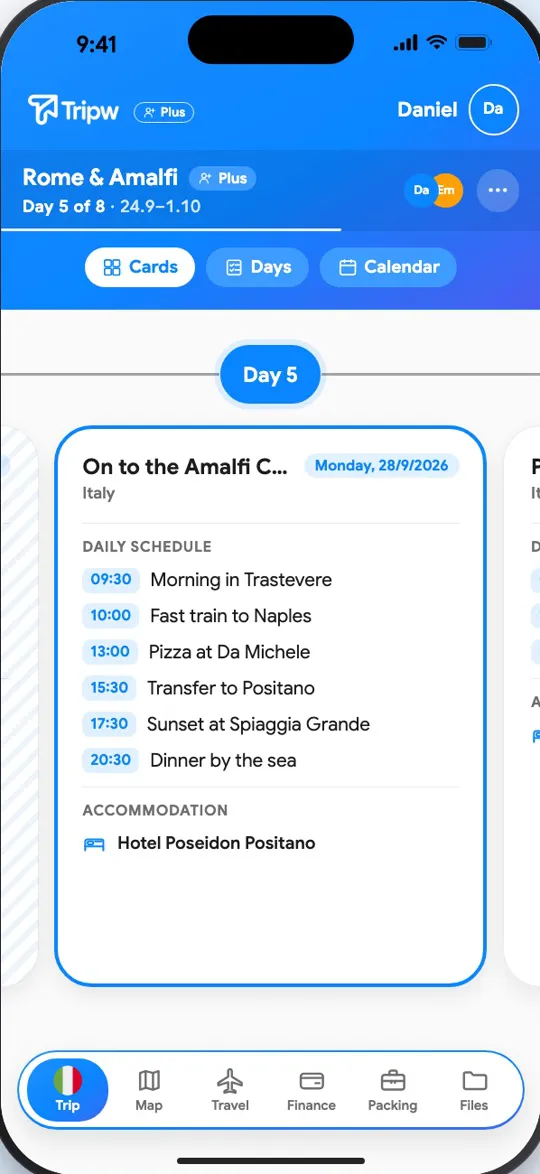
Flights, hotels and a plan for every day — for you and everyone travelling with you. Create a trip in a minute: destination, dates, done.
AI suggests a plan for each day with times and places, and “A different plan” brings an alternative right away. You edit — it does the legwork.
A receipt becomes an expense, and a flight ticket or hotel booking lands in the trip by itself. No typing required.
Invite friends with one code, decide with polls, and keep documents available to everyone — even offline.
Flights, hotels and a plan for every day — for you and everyone travelling with you. Create a trip in a minute: destination, dates, done.
AI suggests a plan for each day with times and places, and “A different plan” brings an alternative right away. You edit — it does the legwork.
A receipt becomes an expense, and a flight ticket or hotel booking lands in the trip by itself. No typing required.
Invite friends with one code, decide with polls, and keep documents available to everyone — even offline.
Everything in one place
Tripw holds the whole trip — from the first flight to the last receipt — and shares it with everyone who's coming, in real time.
Invite the crew with a link or a code. Everyone sees the same trip, every change syncs instantly, and debates end with a poll.
Read the guide →Every day on its own card, with times, places and tasks. Move a task, change its time or send it to another day in a few taps — and a calendar shows the whole trip at a glance.
Read the guide →Who paid, how much and who owes whom — the split works itself out.
Read the guide →A time, a place and an owner for every task, so everyone knows what's next.
The whole route numbered on one map, with each task's name beside its number. Tap a place for directions, Open the day or Open task. Your friends in real time with their photos, and “What’s near me” — sights around you, and with Plus food, coffee and more from Google.
Read the guide →Spotted an Instagram reel, a TikTok, a Facebook post or a place on Google Maps? Share it straight to Tripw and choose: for the whole trip, or for a specific day — where it waits as a picture tile, for the whole group.
The wizard walks you through destinations, flights and hotels, with a short clip at every step. Fill it in by hand, or with AI in Plus: describe the trip in your own words to get destinations and dates, and upload several tickets and confirmations at once.
Read the guide →Flights, hotels and activities in your phone's calendar for free, and with Plus a direct sync to Google Calendar and Outlook. Every change to the trip, by anyone, updates itself.
Read the guide →Everyone ticks off what they've packed, you see what's still missing — and nobody forgets the charger.
Everyone’s balance, the fewest transfers possible, “paid” marks and payment links.
Photos, videos, PDFs and links from the phone’s share menu straight into the trip — and with Plus, up to 5 tickets or confirmations at once for AI import.
Passports and personal documents are shared with the group only if you choose to, and live location is sent only after you agree — and purged within a day.
Every kind of leg with its booking code and time zones — rental cars too, from pickup to return.
A forecast on every day page, for where you are that day.
Visa and insurance — a reminder 30 and 7 days before they run out or before the trip.
What the group needs only once and who brings it — with a nudge to whoever’s on it.
A countdown to the trip, then today’s plan once you’re there — on the lock screen too.
Follows your phone, or pick light or dark in your profile.
Every booking in one place, slotted into the right days.
Attractions and tours near your hotel, ready to book.
One place for everything that happened in the trip — push and email.
Sign in with a glance or a touch, and your trip stays yours.
Add a flight and a clock appears for every time zone it touches.
All of the day's places on a map, with the route between them.
On iPhone: widgets and Live Activities in the Dynamic Island with a countdown to your flight and what's next — without opening the app.
One tab for everything the trip collects: documents with a name, the traveller or day they belong to and details you can edit, photos and video by day, and social picks by day or unassigned. Documents and photos are in Plus, social picks are free.
Read the guide →Forward a booking confirmation to your own address — the flight or hotel lands in the trip.
Add photos and videos to any day, or to the trip without a day — and the app offers the pictures your phone took on those dates. Likes, sharing and saving, for everyone.
Every trip day gets its own chat, album and polls.
Free or Plus
Most of what a trip needs is completely free. Plus lifts the limits and adds places from Google, chat and photos, documents and the AI assistant.
No card needed
First week free
Everything in Free, without limits, plus:
Included in Plus with a fair monthly allowance per feature, shared with the members you approve — or give them full access when you invite them. Nothing is saved without your OK.
Pricing
Three plans for the same Plus. Your first 7 days are free, and you can cancel anytime.
For a short trip, or to try it
$3.99
per week
Unlimited trips, month by month
$7.99
per month
Save 54% vs weekly
Every trip this year, at the lowest price
$59.99
per year
Save 37% vs monthly≈ $5.00 a month
Friends who join a trip you created get every Plus feature, without a subscription of their own. They ask you for the AI assistant, and once you approve, they use your monthly allowance. One plan for the whole group.
Download free, upgrade inside the app
Managed in the App Store or Google Play and renews automatically until cancelled. The final price is shown by the store.
Tripw AI
It plans every day and offers more plans without the wait, fills in a new trip from a few words, reads several tickets and confirmations at once, scans receipts, checks you haven't forgotten a document and suggests group polls with real places. You decide: nothing is saved without your OK.
Tripw Plus unlocks the AI assistant, chat, photos, documents and places from Google — and everyone who joins your trip gets them too, even without their own subscription. The AI opens for them once you approve, or right away if you gave full access in the invite, on your monthly allowance.
Managed in the App Store or Google Play. Cancel anytime.
Free, too: days, tasks, polls, flights, hotels, expenses, maps and routes, the live map and social picks.
Yes. Download it and plan for free: days, tasks, polls, flights, hotels, expenses, maps and routes. Tripw Plus adds the AI assistant, a chat and photos for every day, documents, places from Google and unlimited trips — and the first week is on us.
No. Anyone who joins a Plus member's trip gets every feature in it, even without their own subscription. Invite them with a link or a code — that's it.
Yes. The trip, the schedule and your documents are stored on your phone, so you can open them on the plane or without data. Changes sync when you're back online.
Only what you submitted for that action, plus the trip details it needs, is sent to our AI provider for processing. It isn't used to train models, and nothing is saved to your trip until you confirm. You can turn sharing off anytime in Settings.
Tripw is on the App Store for iPhone, and the Android version is coming to Google Play soon.
Yes. Add a flight and Tripw adds a clock for every time zone it touches. Prices show in the currency you choose, and receipts scanned in another currency are converted at a current rate.
From the guides
 Sep 30, 2026 · 2 min readPlanning a trip with AI: what it does well, and what to checkAI can turn a destination and a few preferences into a day-by-day draft in seconds. Used well, it saves hours of research — as long as you treat the result as a first draft, not a finished plan.
 Sep 29, 2026 · 2 min readHow to split travel expenses with friends (without keeping score all trip)Money is the quickest way to spoil a good trip. A few simple rules — agreed before you leave — keep costs fair and the conversation friendly.
 Sep 28, 2026 · 2 min readHow to plan a group trip without the chaosTen people, ten opinions and one group chat that never stops. A simple way to plan a trip with friends or family: agree on the basics early, share the work and keep every decision in one place.
Download for iPhone or Android, create a trip and invite the crew. Do everything else together.